
How To Build A Restaurant Multi Channel Ordering System In 2026
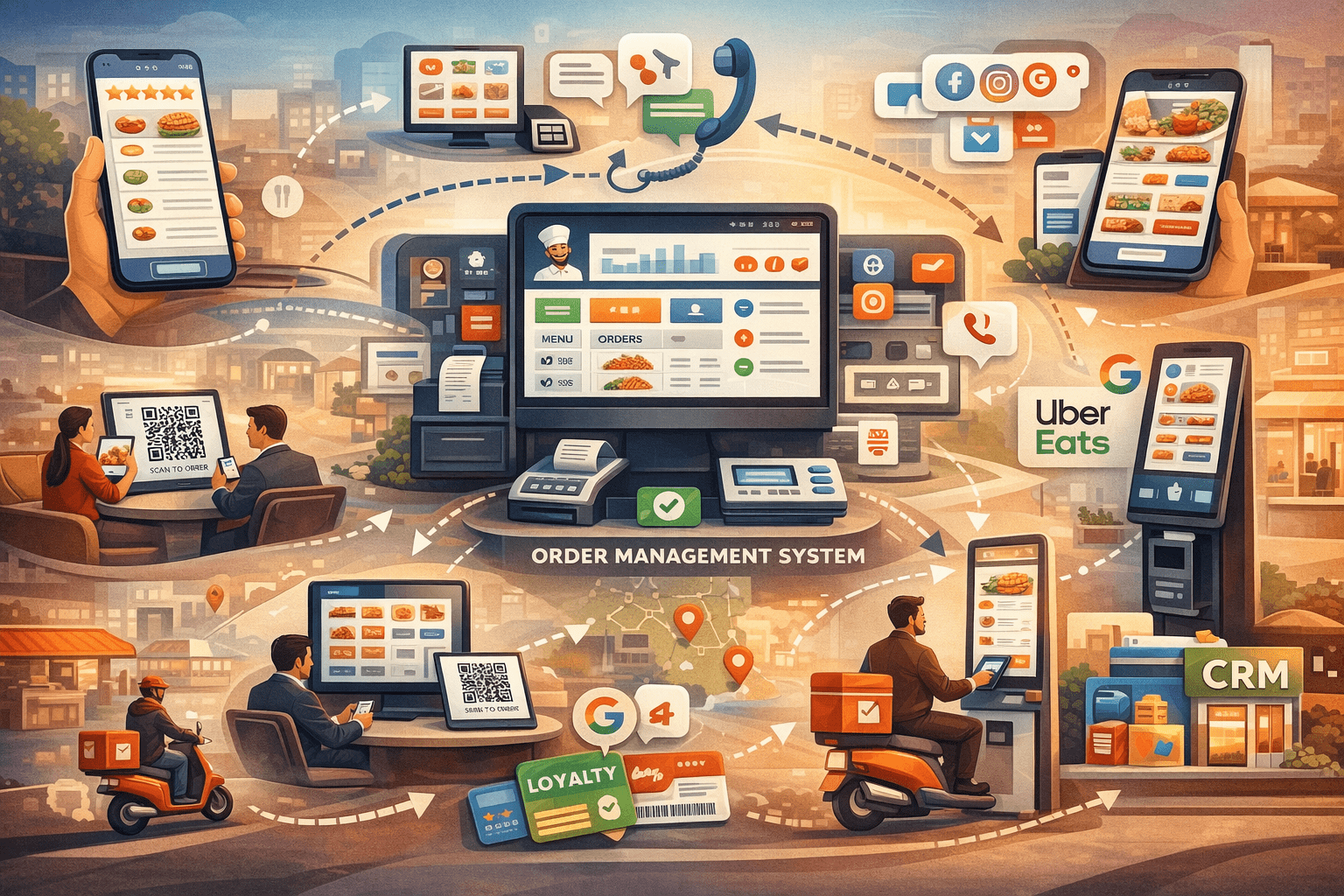
To build a modern online food ordering platform, you must connect all customer ordering points under one menu, one data layer and one customer identity system. A strong multi channel setup lets customers order from apps, web, QR, kiosks, social platforms, phone calls and more, while restaurants manage everything in one place.
Introduction
The world of restaurant ordering system has changed quickly. A few years ago, restaurants mainly relied on simple online ordering. Now, customers use many different ways to place an order. They may scan a QR code at the table, order on the website at home, tap through an app on their phone or use a self order kiosk when they walk in. Some customers even come through social platforms or direct links.
Because of this, restaurants want one system that ties everything together. They want a single setup that keeps the menu, stock, customer accounts, loyalty points, reports and delivery logic in sync. They do not want to manage separate systems that behave differently.
This guide explains, in simple language, how to build a multi channel ordering system that works smoothly in 2026. It follows the same ideas used by top platforms like GloriaFood and also more advanced setups like CusenEats.
Why Multi Channel Ordering System Matters In 2026
Customers today expect to place orders from many channels:
- Mobile apps
- Mobile websites
- Desktop websites
- QR table ordering
- Self order kiosks
- Social media links
- Google ordering (in supported regions)
- Third party delivery partners
- Phone or call centre orders
Restaurants also have their own expectations:
- One central menu
- One shared stock system
- One loyalty system
- One promotions setup
- One analytics layer
- One dashboard for all branches
When you bring all these parts under one roof, the restaurant gains a clean and calm digital workflow. When you fail to do this, the system becomes messy and stressful.
A multi channel system is not a bonus feature anymore. It is the main engine of a modern restaurant's digital life.
Step 1: Build The Unified Menu Layer
The first and most important rule is that all ordering channels must read from the same menu. If you have separate menus, you will end up with different prices, different stock levels and confusing customer journeys.
A strong menu layer must support:
- Categories
- Items
- Variants
- Modifier groups
- Time based menu rules
- Branch specific overrides
- Channel specific availability
This setup becomes the single source of truth. Restaurants only update the menu once, and all channels update automatically. It removes the stress of managing many versions at once.
Step 2: Build Channel Specific Ordering Flows
Even though all channels share the same menu, each channel needs its own customer flow. People behave differently depending on how they order.
Website Ordering
- Larger item images
- Longer checkout steps
- Address checks
- Email first login option
Mobile App Ordering
- Faster screens
- Saved addresses
- Saved payment cards
- Push alerts
QR Table Ordering
- No address needed
- Option to pay later
- Table number linked to order
- Tab or round logic for groups
Self Order Kiosks
- Big buttons
- Clear modifiers
- High contrast for easy reading
- Accessibility options
Marketplace Ordering
- Menu sync
- Stock sync
- Prep time sync
- Orders return to your dashboard
Each channel feels different on the surface, but all follow the same rules behind the scenes.
Step 3: Build Customer Login And Identity Logic
To support multi channel ordering, you must give customers one identity that works everywhere.
Your identity system should support:
- Email login
- Phone number login
- Guest checkout
- One tap account creation
- Social login (optional)
- Device token tracking
When identity works across all channels, loyalty points, order history and saved addresses follow the customer everywhere.
Step 4: Delivery, Pickup And Dine In Logic
Your system must support three main fulfilment types.
Delivery
- Address check
- Map based rules
- Delivery fees
- Flexible driver assignment
Pickup
- Branch selector
- Time slot picker
Dine In Using QR
- Table number
- Tab merging
- Pay later rules
Each fulfilment type needs its own prep time rules and restrictions.
Step 5: Payment Integrations
People use many payment methods today. Your system should support:
- Debit and credit cards
- Apple Pay and Google Pay
- Wallet payments
- Pay at counter for pickup
- Pay at table for QR
- Split payments for dine in groups
Payment choices can also change by channel.
Step 6: The Unified Cart Engine
The cart engine is a very important part of a multi channel system. It must behave the same across all devices.
The cart engine should support:
- Cross device cart sync
- Delivery to pickup switching
- Channel based pricing
- Automatic promotions
- Modifier checks
- Branch based rules
This removes confusion and prevents abandoned carts.
Step 7: Promotions And Coupons Engine
Promotions should work across:
- Mobile
- Web
- QR
- Kiosks
- Pickup
- Delivery
Promotion types include:
- Percentage discounts
- Amount discounts
- Free items
- Buy one get one
- Time limited deals
- Loyalty point boosters
When promotions behave the same across channels, customers trust the system more.
Step 8: Loyalty Integration For 2026
Loyalty must be real time and simple. It should support:
- Points
- Cashback
- Tiers
- Reward catalogue
- Auto earn points
- Auto redeem points
Loyalty must update instantly on all channels.
Step 9: Real Time Sync
A multi channel setup breaks the moment data falls out of sync. All parts of the system must update in real time:
- Menu
- Orders
- Stock
- Customer profiles
- Driver assignment
- Loyalty
- Coupons
- Kiosk status
Good sync makes the system feel alive and stable.
Step 10: Multi Location Logic
Chains need more complex tools:
- Branch selector
- Branch specific menus
- Branch delivery zones
- Branch level prices
- Franchise rules
Without these, it becomes hard to sell to large groups.
Step 11: Queueing And Throttling Logic
Busy kitchens need protection. Your system should:
- Slow down orders when needed
- Limit the number of orders per window
- Adjust prep times
- Combine orders into batches
These small controls prevent kitchen stress during peak times.
Step 12: Integrations With POS, Kitchen And Dispatch
A strong multi channel system must connect to:
- POS
- Kitchen display system
- Delivery tools
- Table booking system
- CRM
- Marketing tools
These links help restaurants avoid double work and mistakes.
Step 13: White Label Multi Channel Ordering
If you plan to serve agencies or resellers, white label tools help.
- Custom branding
- Custom app designs
- Kiosk themes
- Multi channel templates
- Theme builder tools
This is also where a flexible system like CusenEats becomes useful. It helps teams launch fast with a ready ordering system while still allowing custom features later. Many founders use this as a starting point because it gives speed without removing freedom. As they grow and learn from real restaurants, they can add more features on top of the base setup.
Step 14: Analytics For Multi Channel Ordering
Restaurants want to see how each channel performs. You should track:
- Revenue by channel
- Average order value
- Drop off points
- Conversion rates
- Customer groups
- Kiosk versus QR versus app
- Time based order patterns
These insights help restaurants plan better.
Step 15: Launch Strategy
When you launch a new multi channel platform, it helps to start with:
- Popular casual dining restaurants
- Chains that need both web and app
- Restaurants already using QR
- Ghost kitchens
You should adjust the product based on:
- Cart drop offs
- Menu sync issues
- Delivery flow problems
- Payment errors
Every update should make the system calmer, cleaner and easier to use.
Final Thoughts
A strong multi channel ordering system/engine in 2026 joins all customer touchpoints under one clear menu and one data layer. When built properly, it becomes the centre of a restaurant's digital world. It brings order to a space that is often busy, loud and full of moving parts. It helps customers enjoy simple, smooth ordering, and it helps restaurants run with confidence.
This is the foundation of successful platforms like GloriaFood, Uber Eats, ChowNow, Flipdish and more advanced systems like CusenEats.
For tailored advice or to launch your own GloriaFood style platform or a SaaS based food ordering system like CusenEats, feel free to contact Cusenware.